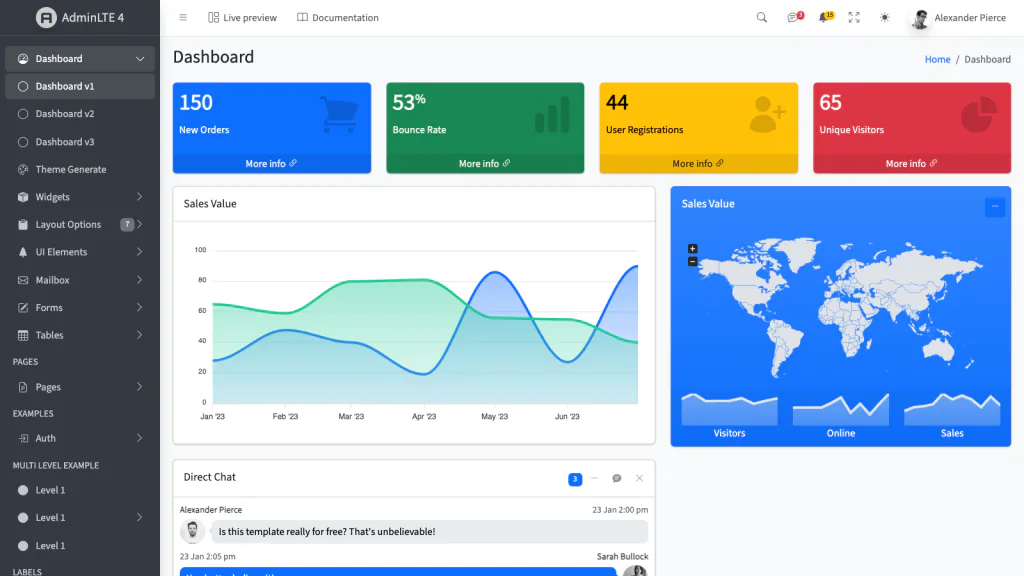
Building admin pages often takes time on repetitive parts: sidebars, headers, tables, buttons, and forms. They all need to look good on both large screens and mobile devices, while the actual application logic has not even been started. AdminLTE is designed to cut down that work by providing a dashboard layout that is ready to use and customize.
What Is AdminLTE?
AdminLTE is an open source admin dashboard template. It is built on Bootstrap 5.3 with vanilla JavaScript, so jQuery is no longer required. The layout is responsive, meaning it adapts from small phone screens to large desktop monitors. It is MIT-licensed.
If the term “template” is new to you, think of it as a pre-built page framework: menus, headers, stat boxes, and tables are already arranged. The developer only needs to fill in the data and adjust colors or sections as needed. This is not a ready-to-run application but a visual foundation for one.
Why Is It Widely Used?
Several reasons explain why AdminLTE is a common choice for projects needing admin pages. Since it is based on Bootstrap, anyone familiar with Bootstrap can adapt quickly. Using vanilla JavaScript without jQuery keeps the code lighter and closer to modern web practices. The project has also been around for a long time, so plenty of examples and community knowledge are available online.
One feature that sets it apart is the range of editions for popular frameworks. The look and feel are the same, but the integration method follows each framework’s conventions.
- HTML and Bootstrap, which is the core of this project
- React and Next.js
- Vue 3 and Nuxt
- Laravel
- Django
- Symfony
- Angular
- ASP.NET Core
- Drupal
Separate documentation covering guides, component lists, and API references is available for each edition.
What’s Included
AdminLTE 4 ships with over a dozen demo pages that can be opened directly, including a calendar, Kanban board, chat, file manager, mailbox, multi-step form, and data tables. These pages serve as real examples of how components work together.
Dark mode is supported through Bootstrap 5.3, and RTL support is also included for right-to-left languages. Colors can be customized, including the option to use one of AdminLTE’s colors as the Bootstrap primary, so that buttons, links, and form focus change accordingly. The latest version also adds sidebar search, corner ribbons on cards, and several profile and post widgets.
What’s New in Version 4
Version 4 is a significant rewrite. The foundation moved to Bootstrap 5.3, and jQuery was removed. There are 18 new demo pages, documentation updates, and several dependency upgrades. For those who used AdminLTE 3, some class names and attributes have changed. For example, .main-sidebar became .app-sidebar, and data-toggle became data-bs-toggle. Dark mode now uses Bootstrap’s native data-bs-theme="dark" attribute.
A migration guide is available in the official documentation for transitioning from version 3, complete with a replacement table for older plugins.
Documentation and How to Try It
The latest demo pages can be viewed without installing anything, and the documentation covers everything from getting started to theme customization. AdminLTE can be used via CDN for those who prefer no build step, or installed through npm and Composer. For installation, customization, and framework integration, the official documentation should be followed since the steps vary by edition.
- Website: adminlte.io
- Version 4 demo: adminlte.io/themes/v4
- Documentation: docs.adminlte.io
- Repository: github.com/ColorlibHQ/AdminLTE
Who Is It For?
AdminLTE is suited for web developers who need to build admin pages and want to save time on the frontend. It is also useful for those who already use Bootstrap and want a more complete dashboard framework. With editions covering multiple frameworks, it works for both simple HTML-based projects and applications built with React, Vue, Laravel, Django, or other frameworks.
Things to Note
AdminLTE is a UI template, not a complete application. When deploying to production, only the compiled build assets like dist/js/adminlte.min.js and dist/css/adminlte.min.css should be uploaded, not the node_modules/ folder, demo pages, or src/ directory.
AdminLTE is MIT-licensed, but the maintainers reserve the right to change the license for future releases. Premium templates are also available separately, while the core version stays free and open source.
Repository: https://github.com/ColorlibHQ/AdminLTE
If you are building an admin page and want to start from a pre-built layout, AdminLTE can save a lot of time. The demo page and documentation are a good place to start to see if the look fits your needs.