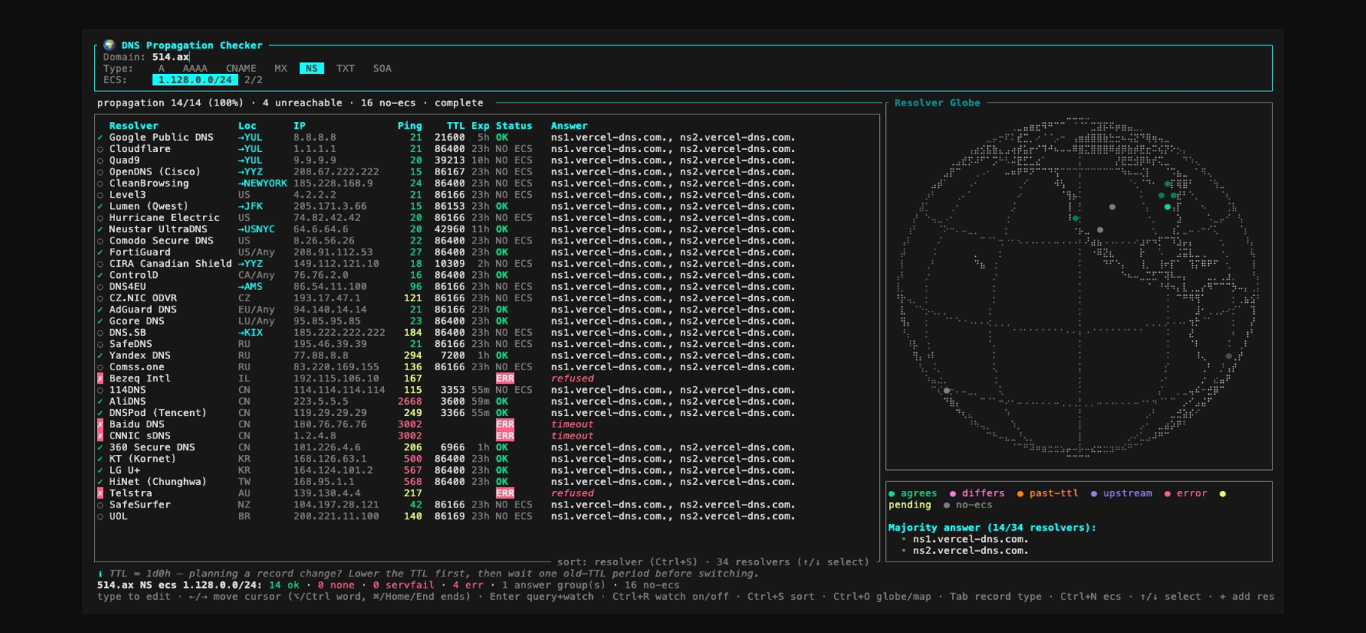
After updating a DNS record, the next question is usually how far the change has spread. Web services like dnschecker.org or whatsmydns.net work for checking, but if you spend most of your day in the terminal, dnsglobe offers a more convenient option.
What Is dnsglobe?
dnsglobe is a DNS propagation checker that runs in the terminal. It is built with Rust as a TUI, and its approach is straightforward: 34 public resolvers from around the world are queried in parallel, their answers are compared, and the spread is displayed on a world map.
The idea is similar to dnschecker.org or whatsmydns.net, except everything happens in the terminal. What sets it apart is the watch mode. Once a check starts, it re-queries every 30 seconds until the record has propagated everywhere. The built-in resolver list covers global anycast networks like Google, Cloudflare, and Quad9, along with resolvers from North America, Europe, Russia, the Middle East, East Asia, and the southern hemisphere.

dnsglobe checking A and NS records across 34 resolvers. Source: 514-labs/dnsglobe repository.
Installation
dnsglobe can be installed through several methods.
brew install 514-labs/tap/dnsglobe   # Homebrew (macOS/Linux)
cargo install dnsglobe               # from crates.io
yay -S dnsglobe                      # from AUR Arch Linux (build from source)
yay -S dnsglobe-bin                  # from AUR Arch Linux (prebuilt binary)
nix run github:514-labs/dnsglobe     # Nix flakes (builds from source)
x eget use 514-labs/dnsglobe         # via eget
Prebuilt binaries are also available on the GitHub Releases page. For Nix users, the project provides an optional flake that can be built with nix build github:514-labs/dnsglobe and developed with nix develop github:514-labs/dnsglobe. For a reproducible development environment, Devbox is available via devbox shell followed by devbox run build.
Running dnsglobe
Without arguments, the app opens in an empty state and waits for a domain name to be typed. If a domain is included directly, the check runs immediately.
dnsglobe                            # start empty, type a domain
dnsglobe example.com                # query immediately and watch
dnsglobe example.com TXT            # same, starting with TXT records
dnsglobe --once example.com TXT     # no TUI: print results and exit (for scripts)
Who Is It For?
dnsglobe is useful for system administrators, domain managers, and developers who frequently deal with DNS changes and need to confirm the updates have spread. Being terminal-based and having a non-interactive mode makes it convenient to use on servers or in scripts. Custom resolver configuration is also helpful for monitoring internal nameservers.
Repository: https://github.com/514-labs/dnsglobe
If you regularly check DNS propagation and prefer working from the terminal, dnsglobe is worth a look. Full documentation, options, and source code are available in the official repository.